Tutorial
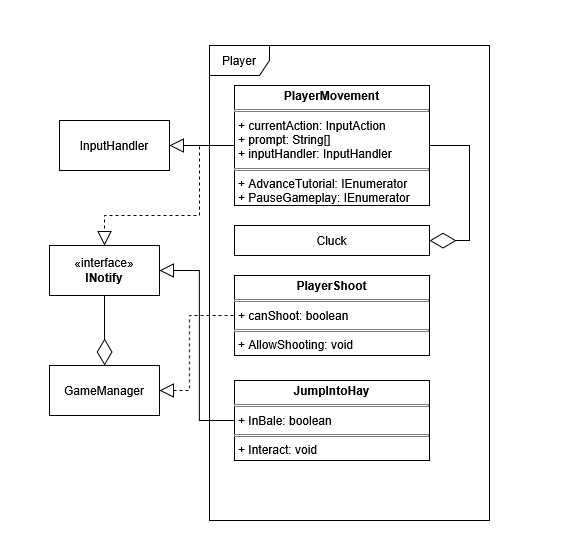
The tutorial system is primarily managed through the PlayerMovement script, as we wanted to limit the player’s actions to only those currently being introduced.
For example, the player begins by simply being able to look around, followed by learning the movement controls.
Since PlayerMovement already handled core movement functionality, it made the most sense to use it as the base for controlling tutorial flow.
To manage which actions are enabled at any given time, we make use of the InputHandler, allowing us to toggle specific inputs on or off depending on the current tutorial step.
For other features, like shooting, the script accesses methods within their respective scripts to toggle whether the player can perform those actions.
As the player progresses, the script also updates the on-screen prompts to reflect the current action being taught, guiding them step-by-step.
Additionally, we implemented INotify within PlayerMovement to detect when specific actions have been completed, allowing the tutorial to progress in a controlled way.
Once the tutorial is finished, we use the GameManager to enable other game features, such as environmental prompts and interactions.